Scarecrow explains
When you are first taught about Electron shells, you are taught that electrons orbit atoms in shells: two in the first shell, eight in the second, eight in the third and so on. The shells model isn’t wrong, but it is over simplified and incomplete, in this simulation we learn about a more advanced model which involves:
- Energy levels – the new name for shells
- Sub-levels – each energy level is split into sub-levels holding different numbers of electrons.
- Orbitals – Regions of space around an atom that can hold up to two electrons.
The energy level of an electron – also known as the principal quantum number – is what you previously knew as its shell. You can still think in terms of shells (many places use energy level and shell interchangeably) but need to rethink the number of electrons that fit in each one.
Each energy level can hold 2n2 electrons:
- n = 1, electrons = 2 × 12 = 2
- n = 1, electrons = 2 × 22 = 8
- n = 1, electrons = 2 × 32 = 18
- n = 1, electrons = 2 × 42 = 32
Each energy level is divided into sub-levels, with the number of sub-levels at energy level equal to the principal quantum number, n.
- At n = 1, there is 1 sub-level
- At n = 2, there are 2 sub-levels
- At n = 3, there are 3 sub-levels
- At n = 4, there are 4 sub-levels.
Sub-levels are also known as sub-shells.
The sub-levels are named after letters, and each contains a different number of orbitals:
- s sub-level – contains 1 orbital with a total of 2 electrons.
- p sub-level – contains 3 orbitals with a total of 6 electrons.
- d sub-level – contains 5 orbitals with a total of 10 electrons.
- f sub-level – contains 7 orbitals with a total of 14 electrons (Note: This goes beyond IB / A-level).
The s-orbital in each s sub-level is always spherical; the higher the energy level of the s-orbital, the greater the radius of the sphere.

The three p-orbitals in each p sub-level are often described as dumbbell-shaped with two balloon-shaped lobes. The three p-orbitals are called px, py and pz because they lie along the axes of 3D space. p-Orbitals in higher energy levels have the same orientation, but are just bigger.
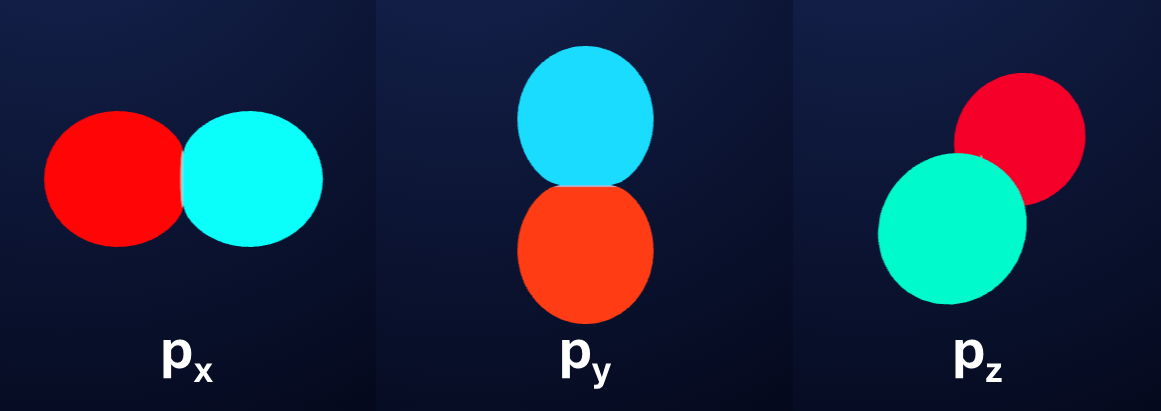
The five d-orbitals in each d sub-level have a range of different shapes determined which are more complex to describe; like all orbitals, their shapes are the solutions to the Schrödinger equation, and as we get to higher sub-levels, these solutions get more complex.

The seven f-orbitals in each f sub-level have even more complex shapes than the d-orbitals.

The electron configuration of an atom is determined by three rules:
- Pauli exclusion principle – this tells us that no two electrons on the same atom can have the same value for each of its four quantum numbers which are:
- Principal quantum number, n – i.e. the energy level or shell.
- Azimuthal quantum number – i.e. the sub-level or shell (s, p, d or f)
- Magnetic quantum number – i.e. the particular orbital (such as 2px, 2py or 2pz)
- Spin quantum number – electrons can either spin up or down, this is why orbitals can only hold up to two electrons.
- Aufbau principle – Electrons fill up orbitals from the lowest energy upwards, filling all orbitals at a lower energy before moving to those at a higher energy.
- Hund’s rule – Electrons will fill orbitals at the same energy level singly before they pair up.
The energy level of an orbital is largely determined by the principal quantum number: higher number = higher energy, but there are some exceptions which must be followed so that we can determine the electron configuration.
The order of filling orbitals is as follows:
- First 36 elements (IB/A-level) = 1s, 2s, 2p, 3s, 3p, 4s, 3d, 4p
- All elements (beyond IB/A-level) = 1s, 2s, 2p, 3s, 3p, 4s, 3d, 4p, 5s, 4d, 5p, 6s, 4f, 5d, 6p, 5f, 6d, 7s, 7p

In general, we can follow the order above to determine the electron configuration, by filling up each sub-level before moving on to the next one.
- E.g. 1: Nitrogen, Z= 7: 1s2 2s2 2p3
- E.g. 2: Scandium: Z = 21: 1s2 2s2 2p6 3s2 3p6 4s2 3d1
- E.g. 3: Bromine, Z = 35: 1s2 2s2 2p6 3s2 3p6 4s2 3d10 4p5
However, there are some exceptions, caused by the fact that some of the sub-levels for particular atoms are so close in energy, that placing electrons in them pushes them higher in energy than ones that should be lower. Two such important exceptions are copper and chromium:
- E.g. 4: Chromium, Z = 24: 1s2 2s2 2p6 3s2 3p6 4s1 3d5
- E,g. 5: Copper, Z = 29: 1s2 2s2 2p6 3s2 3p6 4s1 3d10
To determine the electron configuration of ions, we just add or remove electrons, depending on the charge, adding more electrons to their current maximum sub-level, or removing electrons from it as appropriate. Note, with cations, electrons come from the sub-level with the highest n first, so for example with the first period of transition metals, the 4s orbital empties before the 3d, even though it has lower energy:
- E.g. 6: N3–, Z = 7: 1s2 2s2 2p6
- E.g. 7: Ca2+, Z = 20: 1s2 2s2 2p6 3s2 3p6
- E.g. 8: Fe2+, Z = 26: 1s2 2s2 2p6 3s2 3p6 3d6